

macOS 26+
Track your projects,
right on your Mac.
Sequitur is a Mac app to track the features, bugs and tasks of your software projects. Everything stays on your Mac, and your AI assistant can reach it through the built-in MCP server.
Sequitur: Latin for “it follows”.
Features
What Sequitur does
Numbered tickets
Each project has a short identifier and its tickets are numbered in order: sqtr-1, sqtr-2… Ticket descriptions are written in Markdown.
Features, bugs and tasks
Three ticket types are ready to use. You can rename them, change their symbol or add your own.
Versions
Assign a ticket to the version it's planned for, and record which versions a bug shows up in.
Sub-tasks and tags
Split a ticket into sub-tasks. Use tags to group tickets within a project.
Search and filters
Search titles and combine rules, as in the Finder, to show only the tickets you need.
Attachments
Drag a screenshot or a file onto a ticket. It's copied along with your data, in a folder you can back up.
In practice
How it works
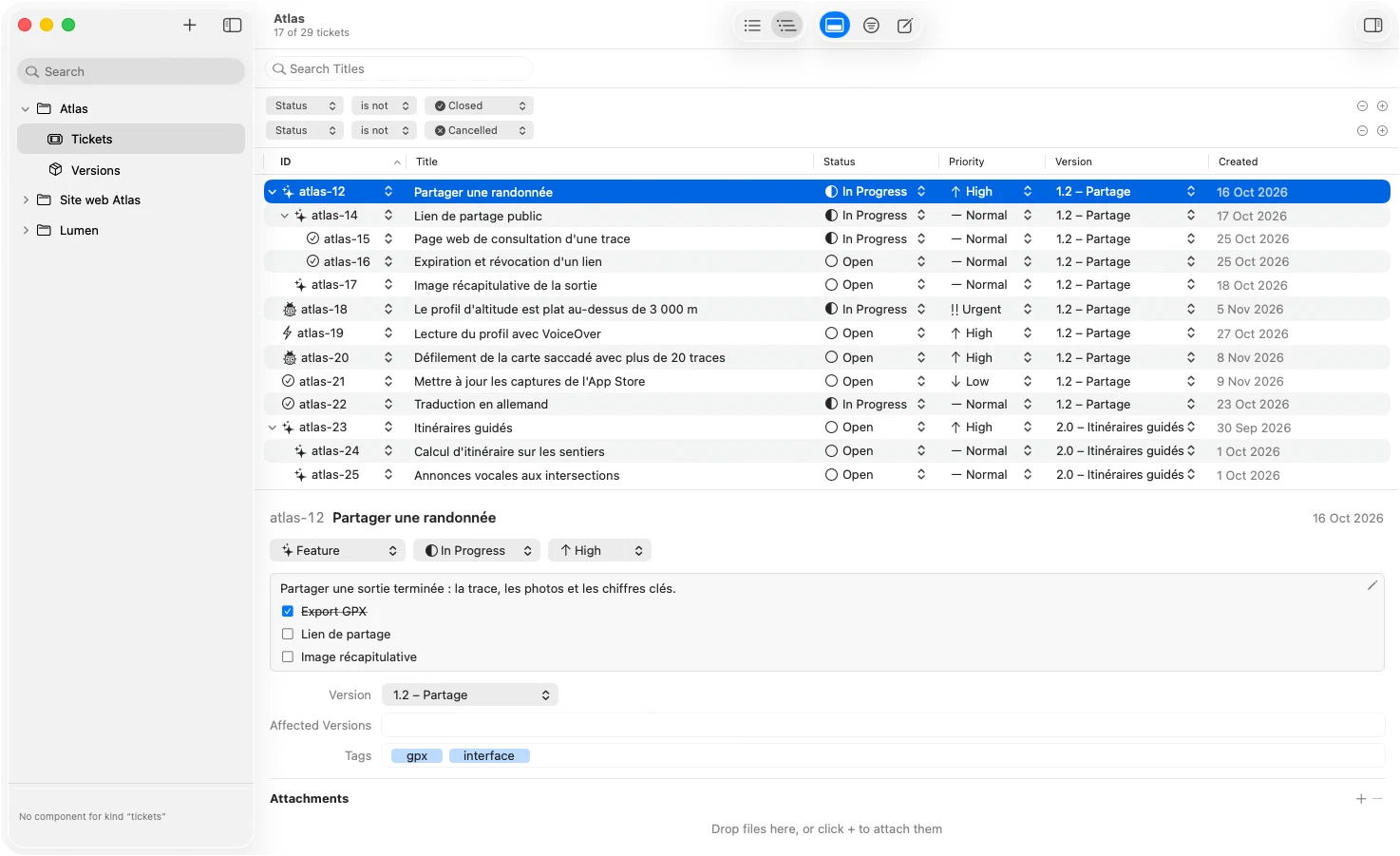
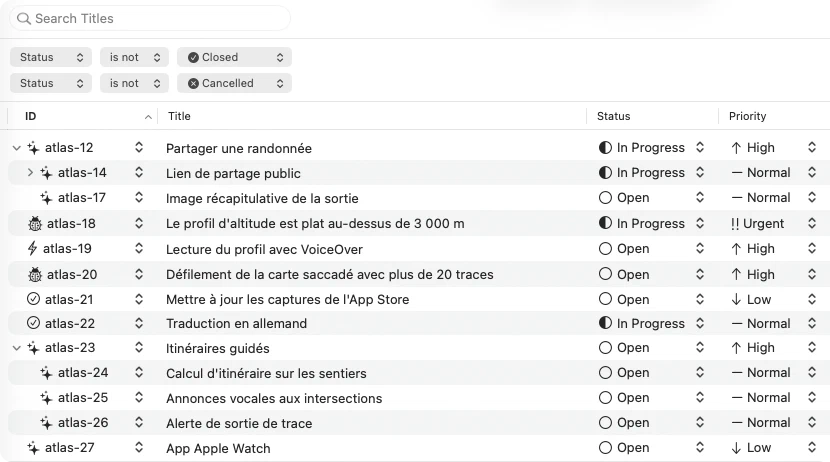
All the tickets of a project
Tickets are listed with their sub-tasks. Status, priority and version are changed right in the list, and filter rules hide what is closed or cancelled.
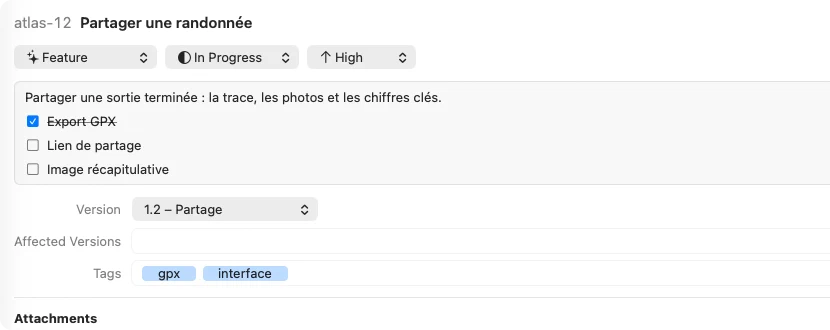
The ticket, right below
Select a ticket: its Markdown description, with its checkboxes, its version and its tags show up under the list and are edited in place.
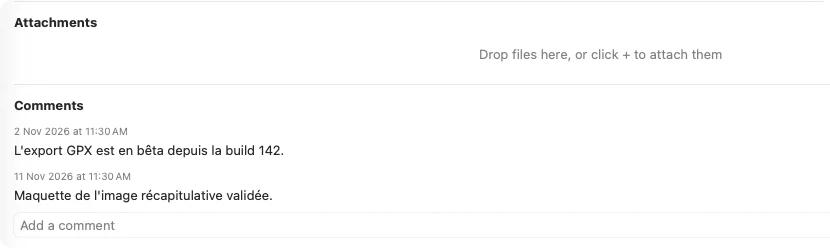
Attachments and comments
Drag a screenshot or a file onto the ticket, then keep track of progress in the comments. They are dated and stay editable.
MCP server
Your tickets, within reach of your AI assistant
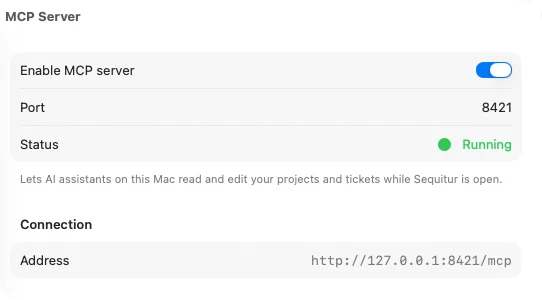
Sequitur includes an MCP server. Once it's on, an assistant such as Claude can read your projects, create tickets, change their status and add comments, without leaving your editor.
Turn the server on
In Sequitur, open Settings › MCP Server and check “Enable MCP server”. The port can be changed in the same place.
Give the address to your assistant
Add the address shown in the settings to Claude Code, Claude Desktop or any other MCP client that accepts an HTTP server.
Ask
“Which bugs are still open for 1.0?”, “Move sqtr-14 to in progress”, “Add a comment with the cause of the crash”.
claude mcp add --transport http sequitur http://127.0.0.1:8421/mcp
The server only listens on your Mac (127.0.0.1). It's off by default and runs while Sequitur is open.
Create a bug in Sequitur: dropping an attachment fails on a closed ticket. Planned for 1.1.
create_ticket
Done: sqtr-21 is created, with the Bug tracker and version 1.1.
The 12 available commands
- Projects
list_projectsget_project- Tickets
list_ticketsget_ticketcreate_ticketupdate_ticket- Comments
add_comment- Versions
list_versionsget_versioncreate_versionupdate_versiondelete_version
Already built
- Projects with identifier, icon & description
- Tickets, trackers, sub-tasks & tags
- Versions (planned & affected tickets)
- Finder-style filters & search
- Attachments in a portable data package
- Markdown descriptions & comments
- MCP server for AI assistants
Coming next
- iCloud sync between your Macs
- JSON backups & Markdown export
- Build runs & logs
- French translation
Questions
Frequently asked questions
What is Sequitur?
A Mac app to track the tickets and versions of your software projects. It runs on your Mac, with no account and no browser.
When will it be available?
Sequitur is still in development. The roadmap above shows what's already done. Write to us to be told when it's released.
Where is my data stored?
In a single file on your Mac (Sequitur.sequiturdata), which holds the database and the attachments. You can move it or back it up like any other file. iCloud sync is planned.
Can I use it with an AI assistant?
Yes. Sequitur includes an MCP server, which you turn on in the settings. An assistant such as Claude can then read and edit your projects, tickets, comments and versions. The server can only be reached from your Mac, and only while the app is open.
Where does the name come from?
From the Latin sequitur, “it follows”.
Which macOS version do I need?
macOS 26 Tahoe or later.
Get notified of the release
Send us an email and we'll write back when the first version is available.
Get notified